Arash Hamdami
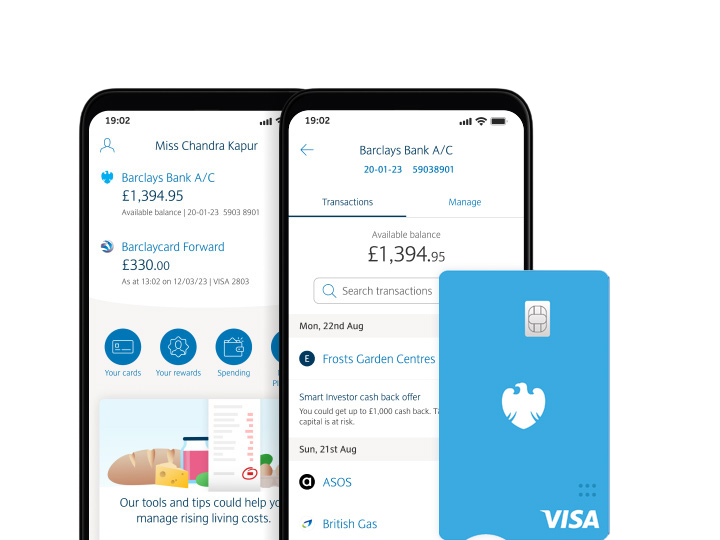
Barclays Mobile Banking App
Designing a clearer, faster and more secure mobile banking experience for retail and business customers across iOS and Android.
Project Highlights

Platform
iOS & Android


Timeline
3 Years

Role
Product Designer

Industry
Banking & Finance
Project overview
I worked on the redesign of the Barclays Mobile Banking app as a UX & Visual Designer, helping to re-evaluate, redesign and improve the mobile banking experience for retail and business banking customers.
The objective was to create a seamless mobile banking experience that allowed users to complete everyday banking tasks quickly and confidently from their phone. This included helping customers view accounts, make payments, transfer money, manage products, access support services and navigate between personal and business banking products more easily.
The project was focused on making the app more intuitive, more visually engaging and easier to use across both iOS and Android. A key part of the work was reducing the need for customers to visit a high street branch by enabling more tasks and services to be completed directly within the mobile app.
My role involved understanding user behaviour, identifying pain points in the existing app, mapping user flows, conducting research, reviewing competitor apps, creating wireframes and designing final mobile UI screens that supported a clearer and more efficient banking experience.
Company background
Barclays is one of the world’s leading financial services institutions, serving personal, business and corporate banking customers across multiple markets.
At the time of the project, Barclays was focused on becoming a leading digital bank and improving the way customers interacted with banking services through mobile technology. As customer expectations were changing and mobile banking adoption was increasing, Barclays needed to ensure that its app could support a wide range of users, banking tasks and account types.
The ambition was to create a mobile banking experience that could reduce dependency on branch visits, improve customer self-service and provide a secure, convenient and accessible way for customers to manage their money on the go.
The app needed to support both retail and business customers, while also providing a consistent experience across different mobile operating systems.
Team structure
For the Barclays Mobile Banking project, I worked as the UX & Visual Designer, responsible for helping shape the app experience from research through to final visual design.
• UX & Visual Designer — myself — responsible for conducting user research, analysing user behaviour, mapping key app journeys, creating user flows, sketching wireframes, designing rapid prototypes and producing final visual UI designs for the mobile banking experience.
• Project Managers — supported delivery planning, project coordination, timelines, stakeholder alignment and communication across the wider team.
• Business Analysts — helped define banking requirements, user stories, business rules, product needs and functional requirements across retail and business banking journeys.
• Developers — supported technical feasibility, implementation and development of the redesigned mobile banking experience across iOS and Android.
• UX Designers — collaborated on research, journey mapping, usability thinking and experience improvements across the app.
• Testers — supported quality assurance, testing and validation to ensure the app worked effectively across devices, platforms and customer scenarios.
• Barclays stakeholders — supported decision-making around banking products, security, customer needs and the wider digital banking strategy.
My responsibility was to help translate complex banking requirements into a simpler, more intuitive mobile experience. I focused on making transactional journeys easier to complete, improving navigation, enhancing visual clarity and ensuring the app could support customers with confidence and security.
The Challenge
The challenge was to create a seamless mobile banking experience that allowed both retail and business customers to complete important banking tasks quickly and confidently from their mobile device.
The existing mobile banking experience needed to evolve because customer behaviour was changing. Users increasingly expected to manage their finances without needing to visit a branch, call customer services or use a desktop banking platform. The app therefore needed to support a wider range of transactions, services and account-management tasks directly from mobile.
One of the main challenges was designing for a broad range of customer demographics. The app needed to be simple enough for everyday users, but also powerful enough to support more complex banking needs across personal and business accounts.
The experience also needed to introduce relevant Barclays products and services without interrupting the natural flow of core banking tasks. The aim was not to push products aggressively, but to surface useful features and services in a way that felt logical, contextual and helpful.
Another key challenge was consistency across iOS and Android. Customers needed to have a smooth and familiar experience regardless of device or operating system. If a user moved from one platform to another, the app still needed to feel recognisable and easy to use.
The main UX challenges included:
• Making transactional objectives easy and quick to complete.
• Helping users organise their finances more effectively.
• Creating a clearer bridge between personal, business and joint-account services.
• Reducing unnecessary complexity in the app navigation.
• Improving the visual design so screens felt cleaner and less cluttered.
• Reducing the need for customers to visit a physical branch.
• Supporting secure transactions and account management through a trusted mobile experience.
• Helping customers discover useful Barclays products and services without disrupting the banking journey.
The Solution
The final solution was a redesigned Barclays mobile banking app that gave retail and business customers a clearer, faster and more secure way to manage their finances from their mobile device.
The experience centred around a simplified accounts landing page, allowing users to quickly view their personal and business accounts, switch between products, check balances, review transactions and access key banking actions such as payments and transfers.
The navigation was restructured around the core tasks customers needed most. This helped reduce clutter, improve clarity and make the app easier to understand at a glance.
The design also introduced clearer access to useful services such as Mobile PINsentry, Branch and ATM Locator, account management, statements and the Feature Store. This helped users complete more banking tasks independently without needing to visit a branch.
Across the app, the interface presented financial information in a more structured and visually digestible way. Clearer hierarchy, cleaner layouts and more intuitive entry points helped customers manage their money with greater confidence, security and ease.
Impact
The Barclays mobile banking experience helped create a more modern, mobile-first approach to everyday banking for retail and business customers. The work improved how users accessed account information, completed transactions and managed banking services through a clearer, more intuitive app experience.
↑ 69% of offline banking customers onboarded to the mobile app post-launch The redesigned onboarding and simplified mobile experience helped convert branch-reliant customers to digital banking.
↓ 35% reduction in onboarding drop-off Improved registration, clearer guidance and simplified setup steps helped more users complete the onboarding journey successfully.
↑ 38% improvement in payment and transfer completion rates Simplified transactional journeys helped users complete payments and transfers more confidently, with fewer abandoned sessions.
↓ 31% reduction in time taken to complete core banking tasks Clearer navigation and more direct entry points helped users access accounts, review transactions, make payments and manage services faster.
↑ 44% improvement in account and product visibility The redesigned accounts landing page made it easier for customers to view personal accounts, business accounts, credit cards, loans and savings products in one place.
↓ 29% reduction in branch dependency for everyday banking tasks By surfacing services such as Mobile PINsentry, statements, account management and support features within the app, customers were able to complete more tasks independently without needing to visit a branch.